TableHarvest finds every table on the page and gets it into Excel, Google Sheets or CSV cleanly: merged cells, currencies and all. No copy-paste mess, no sign-up, and your data never leaves your browser.
Works in Chrome, Edge and Brave. CSV export is free forever.
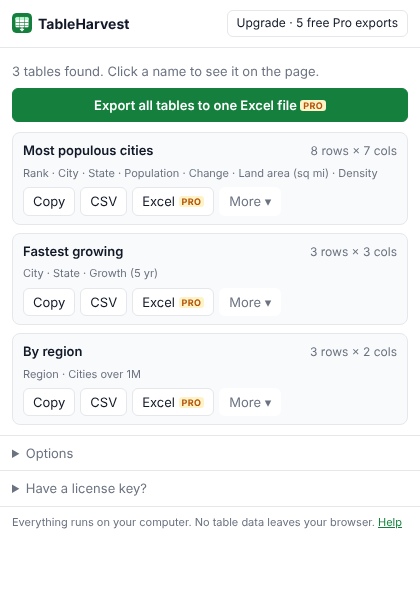
Regular HTML tables plus the div-based "grids" modern web apps use. Click a table's name to see it highlighted on the page.
One click copies a table so it pastes into Excel or Google Sheets as real cells. Also copy as CSV or Markdown.
Download a proper .xlsx with a bold, frozen header row, filters, and numbers stored as numbers: $1,234.50 becomes 1234.5.
Merged cells (rowspan/colspan) are expanded, multi-row headers are combined, and layout tables are skipped.
Results split across pages? Add each page to a collection, then download everything as one file.
Runs only when you click it, and only on that tab. No accounts, no tracking, no servers touching your data.
| Feature | Free | Pro |
|---|---|---|
| Find tables and grids on any page | ✓ | ✓ |
| Copy to Excel / Sheets, CSV, Markdown | ✓ | ✓ |
| Download CSV | ✓ | ✓ |
| Choose columns, remove duplicate rows | ✓ | ✓ |
| Download real Excel (.xlsx) with typed numbers | 5 free tries | ✓ |
| All tables on a page → one workbook | 5 free tries | ✓ |
| Collect rows across multiple pages | 5 free tries | ✓ |
| JSON export | 5 free tries | ✓ |
14-day money-back guarantee. Payments, receipts and sales tax are handled by our reseller, Lemon Squeezy. After purchase you'll get a license key by email; paste it into TableHarvest → "Have a license key?".
Open the page, click the TableHarvest icon, then click Copy on the table you want and paste into any Excel or Google Sheets cell. For a file instead, click CSV (free) or Excel (Pro).
No. It reads the page only when you click the icon, and all processing happens inside your browser. The only network request it makes is checking your license key with our payment provider, if you buy Pro. Privacy policy.
Some sites draw tables as images or canvases, or load rows only as you scroll. Scroll to load the rows, then click "Scan again". Browser pages like chrome:// and the Chrome Web Store can't be read by any extension.
Yes, up to 3 browsers per license. Deactivate in the extension to move it.
Email us within 14 days for a full refund, no questions asked.